



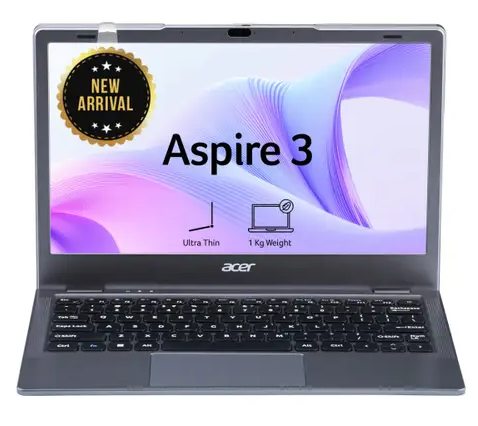
Agar aap Best Laptop Under ₹30,000 in India search kar rahe hain, to is budget mein aapko students, online classes, office work, browsing aur entertainment ke liye kai useful options mil sakte hain. Lekin ₹30,000 ke budget mein laptop choose karte waqt processor, RAM, SSD storage, display aur operating system ko carefully check karna zaroori hai.
Is article mein humne 10 budget-friendly laptop options ko shortlist kiya hai. Aapko yahan har laptop ke main benefits, kis user ke liye suitable hai aur doosre options se kaise better ho sakta hai, ye samajhne mein madad milegi.
Note: Laptop prices aur availability online offers ke according change ho sakti hain. Purchase karne se pehle latest price aur specifications zaroor check karein.
Best Laptop Under ₹30,000 – Quick List
| Laptop | Best For | Main Highlight |
|---|---|---|
| Acer Aspire 3 A324-51 | Students & Office | Core i3 12th Gen, 8GB RAM, 512GB SSD |
| ASUS Vivobook 15 X515EA | Daily Use | Core i3 11th Gen, 8GB RAM |
| Acer Aspire A324-45-V2 | Multitasking on Budget | 12GB RAM |
| Acer Aspire 3 A311-45 | Basic Windows Work | 8GB RAM, SSD |
| ASUS Vivobook Go 15 E510KA | Students | 8GB RAM, 512GB SSD |
| Lenovo Chromebook 11IJL9 | Basic Online Work | ChromeOS |
| ASUS Chromebook CX14 | Browsing & Study | Compact 14-inch design |
| Lenovo 100e Chromebook Gen 4 | Students | Lightweight ChromeOS laptop |
| Primebook 2 Pro | Android-based Use | 8GB RAM, 128GB storage |
| Primebook 2 Max | Large Screen Budget Option | 15.6-inch display |
1. Acer Aspire 3 – Core i3 12th Gen
Acer Aspire 3 ka Core i3 12th Gen variant ₹30,000 ke andar ek interesting option hai. Available listing mein 8GB RAM, 512GB SSD, Windows 11 aur 14-inch display diya gaya hai.
Benefits
- Modern 12th Gen Intel Core i3 processor
- 8GB RAM daily multitasking ke liye useful
- 512GB SSD se fast boot aur better storage
- Windows 11 ka familiar experience
Kiske liye best?
Students, MS Office users, online classes aur normal office work ke liye ye meri top choices mein se ek hai.
Why better than other options? Iska sabse bada advantage newer Core i3 processor aur 512GB SSD combination hai, jo basic Celeron-based laptops se zyada practical ho sakta hai.
2. ASUS Vivobook 15 – Core i3 11th Gen
ASUS Vivobook 15 X515EA series ka Core i3 11th Gen variant bhi budget buyers ke liye ek option hai. Listing mein 8GB RAM, 256GB SSD aur Windows 11 diya gaya hai.
Benefits
- Intel Core i3 processor
- 15.6-inch display
- 8GB RAM
- Windows 11
- Daily work aur study ke liye suitable
Best for: Students aur home users jo larger screen prefer karte hain.
Compared with Acer Aspire 3: ASUS ka 15.6-inch screen advantage ho sakta hai, jabki Acer ka 12th Gen processor aur 512GB SSD zyada attractive specification combination deta hai.
3. Acer Aspire – 12GB RAM Variant
Agar aapka focus multitasking par hai, to Acer Aspire ka 12GB RAM variant consider kiya ja sakta hai.
Benefits
- 12GB RAM
- 256GB SSD
- Windows 11
- Multiple browser tabs aur basic applications ke liye useful
Best for: Students aur users jo ek saath browser, Office aur other lightweight applications chalate hain.
4. Acer Aspire 3 A311-45
Ye option basic Windows users ke liye suitable ho sakta hai. 8GB RAM aur SSD storage ke saath ye browsing, online study aur Office work jaise tasks ke liye designed budget category mein aata hai.
Best for: Students, basic computer users aur online classes.
5. ASUS Vivobook Go 15 E510KA
ASUS ke official information ke according, Vivobook Go 15 E510KA ke ek configuration mein Intel Celeron N4500 processor, 8GB RAM, 512GB PCIe SSD, 15.6-inch Full HD display aur Windows 11 diya gaya hai.
Benefits
- 15.6-inch Full HD screen
- 8GB RAM
- 512GB SSD
- Windows 11
- Students ke liye practical setup
Best for: Online classes, browsing, MS Office aur entertainment.
6. Lenovo Chromebook 11IJL9
Lenovo Chromebook 11IJL9 ek ChromeOS-based option hai. Available listings mein Celeron N4500 processor, 4GB RAM aur 64GB eMMC storage configuration dikhti hai.
Benefits
- Affordable
- Lightweight
- ChromeOS simple aur easy-to-use
- Web browsing aur online learning ke liye useful
Important: Agar aapko Windows-only software chalana hai, to Chromebook lene se pehle compatibility check karein.
7. ASUS Chromebook CX14
ASUS Chromebook CX14 compact 14-inch category mein ek budget option hai. Available listings mein 4GB RAM aur 64GB eMMC storage configuration milti hai.
Best for: Browsing, Google Docs, online classes aur basic productivity.
Why choose it? Agar aapka kaam mostly browser-based hai, to ChromeOS ek simple aur lightweight experience de sakta hai.
8. Lenovo 100e Chromebook Gen 4
Lenovo 100e Chromebook Gen 4 education-focused budget category ka option hai. ChromeOS ke saath ye basic learning aur web-based tasks ke liye suitable ho sakta hai.
Best for: School students, online learning aur basic browsing.
9. Primebook 2 Pro
Primebook 2 Pro Android-based laptop category mein ek different option hai. Available listing mein 8GB RAM aur 128GB storage configuration dikh rahi hai.
Benefits
- 8GB RAM
- Android-based ecosystem
- Budget-friendly
- Android apps ke liye useful
Best for: Users jo Android apps aur lightweight daily tasks ko priority dete hain.
10. Primebook 2 Max
Primebook 2 Max budget category mein larger 15.6-inch display aur 8GB RAM ke saath ek interesting option hai.
Best for: Students aur users jo Android-based laptop mein comparatively bada display chahte hain.
₹30,000 ke andar laptop kharidte waqt kya dekhein?
1. Processor
Agar possible ho to Core i3 ya equivalent modern processor ko preference dein. Celeron-based laptops basic work ke liye theek hain, lekin heavy multitasking ke liye ideal nahi hote.
2. RAM
2026 mein 8GB RAM ko minimum practical target maana ja sakta hai. 4GB RAM wale models ko sirf basic use ke liye consider karein.
3. SSD Storage
256GB SSD se better speed milti hai. Agar 512GB SSD budget mein mil raha ho, to wo long-term use ke liye better choice ho sakta hai.
4. Windows vs ChromeOS
Windows laptop mein traditional PC software compatibility zyada hoti hai. Chromebook web-based work aur online study ke liye better ho sakta hai.
5. Display
Daily study aur office work ke liye Full HD display preferable hai. Screen size bhi apne use ke according choose karein.
Final Verdict: ₹30,000 mein kaunsa laptop lena chahiye?
Agar aap Best Laptop Under ₹30,000 in India choose kar rahe hain, to meri preference Acer Aspire 3 Core i3 12th Gen jaise configuration ko milegi, agar wo ₹30,000 ke andar available ho. 8GB RAM aur 512GB SSD ka combination daily work, study aur multitasking ke liye strong value offer karta hai.
Agar aapko bada 15.6-inch display chahiye, to ASUS Vivobook 15 Core i3 consider kar sakte hain. Basic browsing aur online classes ke liye Chromebook models affordable alternatives ho sakte hain.
Purchase se pehle latest price, warranty, processor generation, RAM upgradeability aur storage ko zaroor verify karein, kyunki online laptop prices frequently change hote hain.